You have a line-of-business application, and you want it to answer a user’s question using your organization’s own email, files, and Teams messages — grounded, cited, and inside your own UI, without you building a retrieval pipeline. You open the docs to call the Copilot Chat API and find two implementations staring back at you: one under the Microsoft Graph beta namespace, one under a hostname you have never seen, with different endpoints, different permission counts, and two entirely separate billing models.
That fork is the subject of this post — because before you write a line of code, this is the choice that shapes your authentication architecture, your enterprise admin consent conversation, and how you get billed. Here are the specific ways it will cost you if you get it wrong.
You will pick the wrong permission model and stall in security review. The Graph beta path requires seven delegated permissions, all of them, at once. The Work IQ path requires one. If you architect against seven scopes when one would do, you have signed your deployment up for a longer enterprise security review and change-management cycle than you needed.
You will assume “GA” means “production-ready for everything.” Work IQ reached general availability in June 2026, and that word will tempt you to treat it as finished for every integration pattern. It is not. There is no application-only (service-account) access on either path, national cloud coverage for Work IQ is undocumented, and per-call pricing is not public. GA is a real signal, but it is not a blank check.
You will treat this like an LLM completion endpoint. If you arrived from Azure OpenAI, you will expect system prompts, token counts, and an OpenAI-compatible shape. This API has none of those. Building against those assumptions means rewriting your integration layer once the first response comes back looking nothing like a completion.
You will lock in a billing model you cannot swap at go-live. The Graph beta path rides your flat M365 Copilot license. Work IQ meters through Copilot Credits. These are distinct systems; you cannot point an application at a Work IQ endpoint and expect flat-license coverage to apply. Choosing late, or choosing without knowing, is an expensive correction.
You will design for durable chat history that does not exist. The conversationId gives you multi-turn continuity within a session. It is not a documented, long-lived persistence layer. Cache it across user sessions in a long-running app and you are building on a contract Microsoft has not made.
After reading this post, you will be able to:
✅ Identify the correct Chat API implementation — Work IQ or Graph beta — for your scenario and your enterprise constraints
✅ Map the exact permission, request, and response shape for each path before you register an app
✅ State precisely what neither implementation can do — actions, application-only access, cross-session persistence, OpenAI compatibility
✅ Explain how the Chat API relates to Copilot Studio declarative agents and Work IQ’s A2A and MCP protocols
Two Implementations, One Copilot: The Landscape Before Your First Line of Code
When the plan for this post was first sketched, “the Chat API” meant one thing: a single preview endpoint under the Microsoft Graph beta namespace that let you send a message to M365 Copilot and get a grounded answer back. As of August 2026, that phrase covers two distinct implementations, and the difference between them is the most consequential decision you make when you adopt this API family.
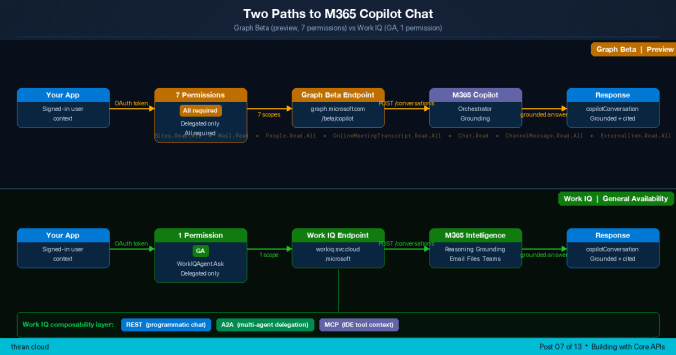
The first is the original Microsoft 365 Copilot Chat API, which lives under the Graph beta namespace at graph.microsoft.com/beta/copilot/conversations. It was announced in October 2025 and remains in preview. The second is the Work IQ Chat API, which reached general availability on June 16, 2026, runs under a separate hostname at workiq.svc.cloud.microsoft, consolidates authorization into a single permission, and is described by Microsoft as “the recommended foundation for new agentic and AI-powered applications on Microsoft 365 data.”
Both share the same request/response model — multi-turn conversations, grounded answers, citations, adaptive cards, synchronous and streaming delivery. They diverge on endpoint, permission model, billing model, and stability. The table below is the orientation you need before any implementation detail.
| Dimension | Graph beta Chat API | Work IQ Chat API |
|---|---|---|
| Endpoint namespace | `graph.microsoft.com/beta/copilot` | `workiq.svc.cloud.microsoft` |
| Status | Preview (`/beta`) — PREVIEW | General availability (June 16, 2026) |
| Announced | October 2025 | June 2, 2026 (GA June 16, 2026) |
| Permission model | Seven delegated scopes, all required | One delegated scope (`WorkIQAgent.Ask`) |
| Billing model | Flat M365 Copilot add-on license | Copilot Credits (usage-based) |
| Auth type | Delegated only | Delegated only |
| Additional protocols | REST only | REST, A2A, MCP |
| Microsoft’s guidance | Actively maintained; still preview | Recommended foundation for new development |
**⚠️ Preview:** The Graph beta Chat API lives under the Microsoft Graph `/beta` version. The reference pages carry Microsoft’s standard warning: “APIs under the /beta version are subject to change. Use of these APIs in production applications is not supported.” Treat any application built against `graph.microsoft.com/beta/copilot` as exposed to breaking changes without notice — factor that into your deployment lifecycle, your SLAs, and your rollback plan.
Microsoft’s recommendation is explicit, but so is what it does not say. Work IQ is the recommended foundation for new development. The Graph beta Chat API documentation remains actively maintained as of August 2026, and no deprecation notice has been issued for it. Both are valid paths; new greenfield work should start with Work IQ unless a specific architectural reason points to the Graph beta path — and, as the sections below show, no such reason is documented today for a net-new application.
Work IQ also carries two protocols the Graph beta path does not: Agent-to-Agent (A2A) for structured multi-agent delegation, and Model Context Protocol (MCP) for tool-based context access from IDEs and coding assistants. Those matter for architectural composability, covered later; for a straight programmatic chat call, the REST endpoint is what you use on either path.
*What this means for you: if you are starting a new application, default to Work IQ and only reach for the Graph beta path if you find a concrete capability you need there — this post is designed to help you find out whether one exists for your case.*
What the Chat API Delivers — and the Five Things It Does Not
Both implementations wrap the full M365 Copilot stack, so their capabilities are the same. Lead with what you actually get, then read the limitations carefully — the limitations are where developer assumptions break.
On the capability side, both implementations give you:
– Multi-turn conversation continuity via a conversationId that ties follow-up messages to the same conversation.
– Enterprise grounding across the signed-in user’s email, calendar, Teams messages, OneDrive files, SharePoint content, and people/org data.
– Web search grounding, enabled by default and toggleable off per message via contextualResources.webContext.isWebEnabled.
– File context injection — supply specific OneDrive or SharePoint files as conversation context through contextualResources.files.
– Text context injection — inject arbitrary grounding text through additionalContext.
– Structured citations (attributions) that link responses back to source documents.
– Adaptive Card renderings of responses for richer UI integration.
– Sensitivity label enforcement and full respect for the signed-in user’s existing M365 permissions, conditional access, and compliance policies.
Now the part that exists to correct the most common misconceptions. Neither implementation can do the following, and none of these are on a documented roadmap you can cite today.
It does no actions. The Chat API cannot create files, send emails, or schedule meetings. It reasons and answers; it does not act on your behalf. If your workflow needs Copilot to *do* something, this API is not the surface for it.
It is not an LLM completion API. The endpoint is not OpenAI-compatible. It does not accept a system prompt, does not return tokens, and cannot be swapped for a POST /completions or POST /chat/completions call. It is a higher-level abstraction over M365 Copilot’s full stack, not a model endpoint.
It has no application-only access. Only delegated (user-signed-in) authentication is supported on both paths. You cannot call it from a background service or daemon without a signed-in user. This is the single limitation most likely to break a planned architecture — there is no service-account invocation.
It is not a chat persistence layer. The conversationId enables multi-turn continuity within a session, but conversations are not persisted across API client sessions the way a chat-history service persists them. There is no durable cross-session transcript here.
It has no tools and generates no images. Responses are text only (in Markdown). There is no code interpreter and no graphic-art or image generation. Additionally, messages that carry long-running tasks are prone to gateway timeouts, so this is not the surface for lengthy background computation.
One more operational nuance sits inside the capability list: the web search toggle is per-turn, not per-conversation. Setting isWebEnabled: false suppresses web grounding for that one message only. If you need web search off for an entire conversation, you set it on every message you send.
*What this means for you: before you commit, walk your requirements against the five limitations above — if any one of them is load-bearing for your design, resolve it now, because none of them are configuration switches you can flip later.*
The Permission Gap: Seven Delegated Scopes vs One — and What It Means for Your Admin Conversation
The permission model is where the two paths diverge most sharply, and it is an architectural decision, not a checkbox. It determines what your enterprise security review looks like and how long your admin consent conversation takes.
The Graph beta Chat API requires all seven of the following delegated permissions, simultaneously. This is not a menu — the documentation footnote states plainly: “You need all of these Microsoft Graph permissions to successfully call the Microsoft 365 Copilot Chat API.”
| Permission | Type | Grounding source it unlocks |
|---|---|---|
| `Sites.Read.All` | Delegated | SharePoint content |
| `Mail.Read` | Delegated | |
| `People.Read.All` | Delegated | People and org data |
| `OnlineMeetingTranscript.Read.All` | Delegated | Meeting transcripts |
| `Chat.Read` | Delegated | Teams chat messages |
| `ChannelMessage.Read.All` | Delegated | Teams channel messages |
| `ExternalItem.Read.All` | Delegated | Connected external content |
**⚠️ Preview:** Requesting seven simultaneous delegated permissions — several of them broad `.All` read scopes over mail, SharePoint, and Teams — against a preview endpoint is an enterprise security event, not a routine consent click. Expect an IT security review, a change-management timeline, and a conditional-access policy review before an admin grants consent. Plan your rollout schedule accordingly, and plan for the possibility that a preview API’s permission surface may change before it reaches GA.
The Work IQ Chat API requires a single delegated permission:
| Permission | Type | OAuth scope value |
|---|---|---|
| `WorkIQAgent.Ask` | Delegated | `api://workiq.svc.cloud.microsoft/WorkIQAgent.Ask` |
The Application ID URI for Work IQ is api://workiq.svc.cloud.microsoft. Admin consent is required, and there is a prerequisite that catches teams off guard: an admin must enable Work IQ in the tenant before the WorkIQAgent.Ask permission will function. Registering the app and consenting to the scope is not sufficient on its own — tenant enablement is a separate, admin-side step.
Two constraints apply to both paths without exception: application permissions are not supported, and personal Microsoft accounts are not supported. Both are work-or-school, delegated-only surfaces.
💡 **Insight:** The single-permission model is architecturally significant beyond convenience. An enterprise consent conversation about one scope is a fundamentally shorter path through security review than a conversation about seven broad read scopes over mail, SharePoint, and Teams. If deployment timeline is a real constraint for you — and in most enterprises it is — the permission surface alone is a strong argument for the Work IQ path.
*What this means for you: count the scopes before you count anything else — if a fast, low-friction admin consent matters to your rollout, the one-permission Work IQ path is the decision the rest of this post will keep confirming.*
Four Request Parameters, a Two-Step Flow, and One Response Shape
Both implementations share the same request body and the same response model. The difference is the call flow: the Graph beta path is a two-step flow (create a conversation, then chat), while Work IQ takes the conversationId directly in the path.
The four request parameters
| Parameter | Required | What it does |
|---|---|---|
| `message` | Required | The user’s message. Contains a `text` string field. |
| `locationHint` | Required | User location for time-sensitive queries. Contains a `timeZone` string in IANA format, e.g. `”America/New_York”`. |
| `additionalContext` | Optional | Extra text grounding — a collection where each item has a `text` field. Use it to inject external document excerpts or context strings. |
| `contextualResources` | Optional | Supplies files as context and/or toggles web search. Contains `files` (array of objects with a `uri` string) and `webContext.isWebEnabled` (boolean). |
The reference table documents locationHint as Required. Omitting it may cause request failures or degrade accuracy for time-sensitive queries. Include it in every request, and set timeZone to the IANA timezone string for the user’s local time zone (for example, "America/New_York").
The Graph beta two-step flow
Step 1 — Create the conversation. Send an empty body; the response is 201 Created with a copilotConversation object whose id is the conversationId you use next.
POST https://graph.microsoft.com/beta/copilot/conversations HTTP/1.1Host: graph.microsoft.comAuthorization: Bearer {token}Content-Type: application/json{}
Step 2 — Send the message. Post to the chat endpoint for that conversation. The response is 200 OK with the updated copilotConversation object.
POST https://graph.microsoft.com/beta/copilot/conversations/{conversationId}/chat HTTP/1.1Host: graph.microsoft.comAuthorization: Bearer {token}Content-Type: application/json{ "message": { "text": "Summarize last week's project status emails." }, "locationHint": { "timeZone": "America/New_York" }, "contextualResources": { "webContext": { "isWebEnabled": false } // web search off for this turn only }}
The Work IQ single-step chat
Work IQ takes the conversationId in the path directly — there is no separate create-conversation call in the same shape. The GA (production) endpoint is:
POST https://workiq.svc.cloud.microsoft/rest/conversations/{conversationId}/chat HTTP/1.1Host: workiq.svc.cloud.microsoftAuthorization: Bearer {token}Content-Type: application/json{ "message": { "text": "Summarize last week's project status emails." }, "locationHint": { "timeZone": "America/New_York" }}
Work IQ also exposes a beta variant of this endpoint at workiq.svc.cloud.microsoft/rest/beta/conversations/{conversationId}/chat; use the GA path above for production work.
Synchronous versus streaming
The examples above are synchronous — a single complete JSON reply, which is simpler to implement and needs no streaming parser. The Graph beta path also offers a streaming endpoint that returns server-sent events, each a partial copilotConversation update, for displaying output incrementally as it is generated:
POST https://graph.microsoft.com/beta/copilot/conversations/{conversationId}/chatOverStream HTTP/1.1Host: graph.microsoft.comAuthorization: Bearer {token}Content-Type: text/event-stream
One testing gotcha: Graph Explorer does not support streamed conversations. Test the streaming endpoint with a dedicated HTTP client, not Graph Explorer.
The response shape
The response is a copilotConversation object. Its top-level fields:
| Field | Type | Description |
|---|---|---|
| `id` | String | Conversation identifier; reuse as `conversationId` |
| `createdDateTime` | DateTimeOffset | When the conversation was created |
| `displayName` | String | Auto-populated from the first message text |
| `state` | copilotConversationState | `active` or `disengagedForRai` |
| `turnCount` | Int32 | Number of completed turns |
| `messages` | copilotConversationResponseMessage collection | The most recent turn’s messages |
Each message in the messages collection carries:
| Field | Description |
|---|---|
| `id` | Message identifier |
| `text` | Response text in Markdown format |
| `createdDateTime` | Message timestamp |
| `adaptiveCards` | Array of Adaptive Card JSON objects for richer UI rendering |
| `attributions` | Array of attribution objects (see below) |
| `sensitivityLabel` | Label details: `labelId`, `displayName`, `tooltip`, `priority`, `color`, `isEncrypted` |
Each attribution object describes a citation or an inline annotation:
| Field | Values / description |
|---|---|
| `attributionType` | `”citation”` (numbered reference) or `”annotation”` (entity inline link) |
| `providerDisplayName` | Source document or entity name |
| `attributionSource` | `”model”` or `”grounding”` |
| `seeMoreWebUrl` | Deep link to the source document or entity |
There is one detail here that will cause a bug if you miss it. The messages array contains both the echoed user message and Copilot’s reply. The first element is the echoed user message; the second is Copilot’s response.
💡 **Insight:** Do not assume index 0 is Copilot’s answer. The first element of the `messages` array is the user’s own message echoed back; Copilot’s reply is the second element. Extract the response by role or by index position deliberately — a naive `messages[0]` reads the user’s own text back to them.
The state field returns one of two values, and the second one needs handling.
**Note:** A `state` of `disengagedForRai` indicates that Copilot declined to respond, consistent with M365 Copilot’s Responsible AI policies. The documentation does not specify which conditions trigger this state. Treat it as a safe-stop signal: surface a user-facing message and allow the user to rephrase or start a new conversation. Do not retry the identical request in a loop.
*What this means for you: build your response parser to read messages[1] (not messages[0]) for Copilot’s answer, always send locationHint, and add an explicit branch for disengagedForRai before you consider the integration complete.*
Two Billing Models That Cannot Be Swapped at Go-Live
The billing model is tied to the implementation you pick, and the two models are entirely distinct. You choose the billing model when you choose the endpoint — you cannot decide it separately at go-live.
The Graph beta Chat API is covered by the flat Microsoft 365 Copilot add-on license. It is free to call for a user who holds that add-on, and it requires Microsoft 365 E3 or E5 (or equivalent) as a prerequisite. Support for users *without* a Copilot add-on license is not currently available — calling the Graph beta endpoint on behalf of an unlicensed user does not work.
The Work IQ Chat API is billed through Copilot Credits, a usage-based model managed via the Cost Management dashboard in the Microsoft 365 admin center. Copilot Credits operate separately from the flat M365 Copilot license — they are a different meter entirely.
The trap is assuming the two are interchangeable. They are not. You cannot point an application at a Work IQ endpoint and expect flat Copilot-license coverage to apply, and you cannot expect Copilot Credits to cover a Graph beta call. Because the models are distinct and tied to the endpoint, this decision has to be made before you commit to an implementation path — retrofitting a billing model after build is not a supported move.
Per-call cost for the Work IQ path is not publicly stated. Cost is metered through Copilot Credits; consult the Copilot Credits Licensing Guide at aka.ms/CopilotCredits/LicensingGuide for current pricing and consumption rates, and manage consumption through the Cost Management dashboard.
*What this means for you: decide your billing model as part of choosing your endpoint — if predictable flat-rate cost per licensed user matters more than usage granularity, that favors the Graph beta license model; if you need to serve users beyond your Copilot-licensed population, only the Work IQ credits model can bill for it.*
Where the Chat API Ends and Declarative Agents Begin
The most common architectural confusion in this space is between calling the Chat API programmatically and building a declarative agent in Copilot Studio. They are not competing choices for the same job — they solve different problems.
The Chat API calls M365 Copilot’s orchestrator directly. There is no named agent, no persistent identity in the Copilot UI, and no packaging step. You invoke Copilot’s grounding and reasoning from your own application code and render the response in your own UI.
A declarative agent is a packaged, deployed thing with its own name and identity. It surfaces inside the Copilot chat UI, can carry custom instructions and scoped knowledge (for example, a specific SharePoint site), and can be deployed to Teams.
The decision comes down to what you need:
| If you need… | Use |
|---|---|
| Custom instructions | Declarative agent |
| Scoped knowledge (e.g., one SharePoint site) | Declarative agent |
| Persistent identity in the Copilot UI | Declarative agent |
| Deployment to Teams | Declarative agent |
| Programmatic invocation from application code | Chat API |
| Rendering responses in your own UI | Chat API |
| Embedding Copilot reasoning into a workflow | Chat API |
| Agent-to-agent delegation | Chat API (Work IQ A2A) |
These are not mutually exclusive architectures. Work IQ supports the Agent-to-Agent (A2A) protocol at https://workiq.svc.cloud.microsoft/a2a/, which lets other agents — including Copilot Studio declarative agents — delegate tasks to Work IQ.
💡 **Insight:** A2A makes the Chat API and declarative agents composable, not competing. A Copilot Studio declarative agent can delegate a grounding task to Work IQ rather than reimplementing the reasoning itself. If you have been framing this as “programmatic Chat API *or* declarative agent,” the Work IQ path lets you have both — a declarative agent as the user-facing identity, Work IQ as the grounding engine behind it.
Work IQ’s third protocol, MCP (Model Context Protocol), is a separate use case again: tool-based context access from IDEs, CLIs, and AI coding assistants, local and remote. It is not part of the programmatic chat flow, but it belongs in your mental model of what Work IQ exposes — REST for service-hosted agents and orchestrators, A2A for multi-agent delegation, MCP for tool-based context in developer tooling, all over the same underlying intelligence layer that reasons across email, meetings and calendar, OneDrive and SharePoint, Teams messages, people/org context, Planner plans, and enterprise search.
*What this means for you: if the goal is a named assistant your users see inside Copilot, build a declarative agent; if the goal is Copilot’s answers inside your own application, call the Chat API — and if you need both, use Work IQ’s A2A protocol to connect them rather than choosing one.*
National Cloud, Compliance, and Terms of Use
For government and regulated-industry deployments, cloud availability is an architectural gate, not a footnote — and this is one place where the two paths are documented very differently.
The Graph beta Chat API publishes a national cloud availability table:
| Cloud | Available |
|---|---|
| Global service | Yes |
| US Government L4 (GCC High) | Yes |
| US Government L5 (DOD) | Yes |
| China (21Vianet) | No |
Work IQ does not publish an equivalent table.
**Note:** Work IQ national cloud availability is not documented in Microsoft’s public reference pages as of August 2026. Do not assume it matches the Graph beta path’s GCC High or DOD coverage. If your deployment requires GCC High or DOD coverage, verify Work IQ eligibility with your Microsoft account team before committing to this implementation path.
On the security and compliance model, both implementations behave identically because both inherit Microsoft Graph’s model:
– OAuth 2.0 via Microsoft Entra ID — the same authentication and authorization model as Microsoft Graph. (For the delegated-flow mechanics this builds on, see Post 02.) – Permission trimming — results are scoped to content the signed-in user is permitted to access. – Sensitivity labels — content with restricted labels is not returned to users without access. – Conditional access — tenant conditional-access policies automatically apply to Chat API calls. – Purview — compliance, audit logging, and monitoring cover Chat API interactions through Microsoft Purview.
Finally, terms of use. The two paths sit under two separate agreements, and you accept the one that matches your path:
– Graph beta Chat API: “Microsoft 365 Copilot APIs Terms of Use (preview)” — https://learn.microsoft.com/en-us/legal/m365-copilot-apis/terms-of-use
– Work IQ: “Microsoft Work IQ APIs Terms of Use” — https://learn.microsoft.com/en-us/legal/work-iq-apis/terms-of-use
*What this means for you: if you are deploying into GCC High or DOD, the Graph beta path is the one with documented coverage today — confirm Work IQ eligibility with your account team before you make the government-cloud decision, and do not assume parity.*
Ten Things to Verify Before Your First Production Request
Consolidate the go-live decisions into one pass. Group them by area and check each one for your chosen path.
Licensing and billing
– [ ] Billing model: Confirm which model applies to your path — flat M365 Copilot add-on license (Graph beta) or Copilot Credits usage-based billing (Work IQ). They cannot be swapped after build. – [ ] License prerequisite (Graph beta): Confirm calling users hold the M365 Copilot add-on and the tenant has M365 E3 or E5; unlicensed users are not supported. – [ ] Terms of Use: Accept the agreement for your path — “Microsoft 365 Copilot APIs Terms of Use (preview)” for Graph beta, or “Microsoft Work IQ APIs Terms of Use” for Work IQ.
Tenant and app configuration
– [ ] Work IQ tenant enablement: For the Work IQ path, confirm an admin has enabled Work IQ in the tenant — the WorkIQAgent.Ask permission does not function until this is done.
– [ ] App registration and consent: Register the app with the correct scopes for your path — all seven Graph delegated permissions, or the single WorkIQAgent.Ask scope — and obtain admin consent.
– [ ] National cloud (government deployments): For GCC High or DOD, confirm the Graph beta path’s documented coverage, or verify Work IQ eligibility with your Microsoft account team, since Work IQ coverage is undocumented.
Implementation and runtime behavior
– [ ] Streaming test client: Test the chatOverStream endpoint with a dedicated HTTP client — Graph Explorer does not support streamed conversations.
– [ ] locationHint: Send locationHint (documented as Required) with an IANA timeZone string on every request.
– [ ] conversationId lifetime: The documentation does not specify how long a conversationId stays valid or when a conversation expires. Design conservatively — do not cache conversationId values across user sessions for long-lived applications; treat each new user session as a new conversation.
– [ ] disengagedForRai handler: Implement an explicit handler for the disengagedForRai state — surface a user-facing message and let the user rephrase or restart. Do not retry the identical request blindly.
On rate limits, one note so you do not go looking for a number that is not there: standard Microsoft Graph throttling applies — 429 responses include a Retry-After header — and no API-specific rate ceiling is documented for the Chat API at the time of writing. See Post 03 for the general Graph throttling pattern.
✅ **Quick win:** Before you register an app or write a line of code, run a real request against your own M365 data using the interactive demo at `https://aka.ms/copilot.dev?k=API`. No app registration, no setup — it lets you see the actual response shape, the echoed-user-message behavior, and the citation structure against your own tenant, so your build starts from what the API really returns instead of what you assumed it would.
*What this means for you: treat this list as your pre-flight — clearing all ten before your first production call is what separates a clean go-live from a security-review stall or a runtime surprise.*
Now What? Your Next Three Steps
1. Run a live request against the interactive demo — Go to https://aka.ms/copilot.dev?k=API and send a real Chat API request against your own M365 data with zero setup, so you see the actual response shape before you build.
2. Choose your path and verify the prerequisite — Use the comparison and permission tables in this post to pick Work IQ or Graph beta, then confirm your admin has enabled Work IQ in the tenant (Work IQ path) or consented to all seven Graph permissions (Graph beta path).
3. Read Post 08 (Meeting Insights API) — Understand how Copilot-enabled meeting intelligence is exposed as structured data, a complementary data source for applications that already invoke the Chat API.
How to Navigate This Series
This series runs 13 posts across three phases: Phase 1 (Foundations and Governance) covers the API landscape, auth, reporting, and admin APIs; Phase 2 (Building with Core APIs) covers the individual data and reasoning APIs; Phase 3 (Agents and Extensibility) covers connectors, agent types, Copilot Studio, and integration patterns.
– Phase 1 — Foundations and Governance: Post 01 (API landscape), Post 02 (Auth and permissions), Post 03 (Rate limits and reliability), Post 04 (Usage Reports API)
– Phase 2 — Building with Core APIs: Post 05 (Package Management API), Post 06 (Retrieval API), Post 07 (Chat API — this post), Post 08 (Meeting Insights API), Post 09 (AI Interactions Change Notifications)
– Phase 3 — Agents and Extensibility: Posts 10–13
By role:
– Application developer building on Copilot data: → Post 01 → Post 02 → Post 06 → Post 07 → Post 08
– Solution architect evaluating the API family: → Post 01 → Post 07 → Post 11
– IT admin managing consent and licensing: → Post 02 → Post 07 → Phase 3 (Posts 10–13)
New to the series? Start with Post 01 for the full API family context. This post builds on the delegated-auth mechanics in Post 02, and it complements Post 06 (Retrieval API) — the alternative when you need RAG grounding from enterprise content without a full conversation turn.
The immediate next post is Post 08 — Meeting Insights API: structured meeting intelligence from Copilot-enabled meetings.
References
All claims in this post trace to the following official Microsoft documentation:
- 1. M365 Copilot Chat API Overview (Preview) — https://learn.microsoft.com/en-us/microsoft-365/copilot/extensibility/api/ai-services/chat/overview
- 2. Create Copilot Conversation —
POST /beta/copilot/conversations— https://learn.microsoft.com/en-us/microsoft-365/copilot/extensibility/api/ai-services/chat/copilotroot-post-conversations - 3. Chat (synchronous) —
POST /beta/copilot/conversations/{id}/chat— https://learn.microsoft.com/en-us/microsoft-365/copilot/extensibility/api/ai-services/chat/copilotconversation-chat - 4. Chat Over Stream (SSE) —
POST /beta/copilot/conversations/{id}/chatOverStream— https://learn.microsoft.com/en-us/microsoft-365/copilot/extensibility/api/ai-services/chat/copilotconversation-chatoverstream - 5. copilotConversation resource type — https://learn.microsoft.com/en-us/microsoft-365/copilot/extensibility/api/ai-services/chat/resources/copilotconversation
- 6. M365 Copilot APIs Overview — https://learn.microsoft.com/en-us/microsoft-365/copilot/extensibility/copilot-apis-overview
- 7. Security and authentication for Copilot APIs — https://learn.microsoft.com/en-us/microsoft-365/copilot/extensibility/copilot-apis-security-authentication
- 8. What’s New for M365 Copilot Developers — https://learn.microsoft.com/en-us/microsoft-365/copilot/extensibility/whats-new
- 9. What’s New Archive (Chat API announced October 2025) — https://learn.microsoft.com/en-us/microsoft-365/copilot/extensibility/whats-new-history
- 10. Microsoft Work IQ API overview — https://learn.microsoft.com/en-us/microsoft-365/copilot/extensibility/work-iq/api-overview
- 11. Work IQ Chat API — synchronous endpoint reference — https://learn.microsoft.com/en-us/microsoft-365/copilot/extensibility/work-iq/rest/copilotconversation-chat
- 12. Work IQ Permissions Reference — https://learn.microsoft.com/en-us/microsoft-365/copilot/extensibility/work-iq/permissions
- 13. Announcing the new Work IQ APIs (June 2, 2026 blog; GA June 16, 2026) — https://www.microsoft.com/en-us/microsoft-365/blog/2026/06/02/announcing-the-new-work-iq-apis/
- 14. Copilot Credits usage-based billing overview — https://learn.microsoft.com/en-us/microsoft-365/copilot/usage-based-billing-overview-copilot-credits
- 15. M365 Copilot APIs Terms of Use (preview) — https://learn.microsoft.com/en-us/legal/m365-copilot-apis/terms-of-use
- 16. Microsoft Work IQ APIs Terms of Use — https://learn.microsoft.com/en-us/legal/work-iq-apis/terms-of-use