Series: Microsoft 365 Copilot APIs with Microsoft Graph — Post 04 of 13
Phase: Foundations and Governance
Audience: IT admins, M365 admins, and Copilot deployment leads
Draft date: 2026-06-13
The Governance Pressure Behind Every Copilot Deployment
Every Copilot deployment reaches the same moment. Leadership asks for ROI numbers to justify the per-user license spend. The security team asks what users are actually doing with Copilot. The compliance team asks for evidence that sensitive content is not leaking through Copilot responses. The IT admin sits in the middle of those three demands with a browser tab open to the Microsoft 365 admin center, copying numbers into a spreadsheet by hand each week.
The admin center is a dashboard. It answers a question once, for whoever is looking at the screen. It does not schedule itself, compare last quarter to this one, or feed a downstream system without a manual export. As adoption reporting becomes a recurring obligation rather than a one-time curiosity, the manual click-through stops scaling.
The Microsoft 365 Copilot Usage Reports API is the programmatic path to the same underlying adoption data. It returns that data in a form that can be scheduled, pipelined, compared over time, and ingested by any reporting system — without anyone logging into the admin center. But the more important point for an admin is not how to call it. It is understanding what the API returns, what it deliberately withholds, and why those boundaries are governance decisions rather than gaps to work around.
Two URL Namespaces, One Data Set
The first thing an admin hits when searching the documentation is confusion: there appear to be two different sets of URLs for the same Copilot usage data. Resolving this before anything else saves a wasted integration build.
The data has migrated to a new URL path segment. The canonical, generally available endpoints now live under /v1.0/copilot/reports/. The older endpoints under /beta/reports/ still respond, but their documentation carries an explicit notice directing callers to use the /copilot path segment going forward. The two paths return the same underlying data; only one is the path you should build against.
| Path | Status | What to do |
|---|---|---|
/v1.0/copilot/reports/... | GA — canonical | Build all new integrations here |
/beta/reports/getMicrosoft365Copilot... | Beta — superseded | Migrate existing integrations off this path |
Note: The old
/beta/reports/path remains functional today, and Microsoft has not published a deprecation date for it. Treat the absence of a date as a reason to migrate sooner, not later. If your team built a usage-reporting pipeline against the beta path before the GA endpoints existed, plan the move to/v1.0/copilot/reports/now while both paths still return identical data.
Permissions and Role Requirements
A common assumption is that pulling tenant-wide adoption data requires Global Administrator. It does not.
The single permission required for all three endpoints is Reports.Read.All, and it applies to both delegated and application permission types. There is no higher-privilege alternative scope to request — this is one permission, not a bundle. For an adoption program lead who needs to justify an app registration to the security team, that single-permission story is a genuine advantage. (See Post 02 for the full delegated-versus-application permission model and the consent process.)
Delegated access carries one additional requirement. Beyond Reports.Read.All consent, the signed-in user must hold a supported admin role. The role determines not just whether the call succeeds, but how much of the data the caller can see.
| Role | Per-user detail rows | Tenant-level aggregate |
|---|---|---|
| Reports Reader | Yes | Yes |
| Exchange / SharePoint / Teams / Lync Administrator | Yes | Yes |
| AI Administrator | Yes | Yes |
| Company Administrator (Global Admin) | Yes | Yes |
| Global Reader | No | Yes |
| Usage Summary Reports Reader | No | Yes |
The Reports Reader role is the least-privileged option that still returns per-user detail, which makes it the right default for a reporting service account. Note the boundary at the bottom of the table: Global Reader and Usage Summary Reports Reader see aggregate counts only. They cannot read per-user rows regardless of any other tenant setting.
Application-level access — a registered app with Reports.Read.All application permission and no signed-in user — is fully supported. This is the pattern for scheduled, unattended pulls, and it is covered in the integration section below.
The Three Endpoints and What Each Returns
The API exposes three endpoints, each answering a different reporting question: who is using Copilot, how many people are using it, and how that number is moving over time. All three take a single period parameter that accepts D7, D30, D90, D180, or ALL. The maximum rolling window is 180 days; ALL returns the 7-, 30-, 90-, and 180-day windows together in one response, which is useful for a cold-start dashboard build.

getMicrosoft365CopilotUsageUserDetail
This is the per-user endpoint. For every user licensed for Microsoft 365 Copilot at any point in the past 180 days — including users whose license was later removed and users with zero usage — it returns a row of last-activity dates.
GET https://graph.microsoft.com/v1.0/copilot/reports/getMicrosoft365CopilotUsageUserDetail(period='D30') HTTP/1.1Authorization: Bearer {token}# Response is a Stream (200 OK, application/json)# Large tenants: check for @odata.nextLink in the response and follow it for pagination
The response carries a last-activity date per user, broken out by app. The key fields:
| Field | Meaning |
|---|---|
reportRefreshDate | Date the report data was last refreshed |
userPrincipalName | User identity — hashed by default (see the privacy section) |
displayName | Display name — hashed by default |
lastActivityDate | Most recent Copilot activity across any app |
copilotChatLastActivityDate | Last activity in Copilot Chat |
microsoftTeamsCopilotLastActivityDate | Last activity in Teams |
wordCopilotLastActivityDate | Last activity in Word |
excelCopilotLastActivityDate | Last activity in Excel |
powerPointCopilotLastActivityDate | Last activity in PowerPoint |
outlookCopilotLastActivityDate | Last activity in Outlook |
oneNoteCopilotLastActivityDate | Last activity in OneNote |
loopCopilotLastActivityDate | Last activity in Loop |
Read that field list carefully, because what is absent matters as much as what is present. Every field is a date. There is no per-user prompt count, no conversation content, and no response-quality signal. The endpoint reports when a user was last active, not how much they used Copilot or what they did with it.
getMicrosoft365CopilotUserCountSummary
This is the tenant-level aggregate. Instead of one row per user, it returns enabled and active user counts for the tenant, broken down by app.
GET https://graph.microsoft.com/v1.0/copilot/reports/getMicrosoft365CopilotUserCountSummary(period='D30') HTTP/1.1Authorization: Bearer {token}
The response contains an adoptionByProduct array with, for each app, an enabledUsers and an activeUsers figure — for example wordEnabledUsers / wordActiveUsers, microsoftTeamsEnabledUsers / microsoftTeamsActiveUsers, and an anyAppEnabledUsers / anyAppActiveUsers pair for the tenant overall. The covered apps are Teams, Word, Excel, PowerPoint, Outlook, OneNote, Loop, and Copilot Chat. This is the endpoint that answers “how many of our licensed users are actually using Copilot, and in which apps.”
getMicrosoft365CopilotUserCountTrend
This is the time series. It returns the same enabled and active counts as the summary endpoint, but as a daily series rather than a single snapshot.
GET https://graph.microsoft.com/v1.0/copilot/reports/getMicrosoft365CopilotUserCountTrend(period='D30') HTTP/1.1Authorization: Bearer {token}
The response carries an adoptionByDate array — one entry per day in the window, each holding the same per-app enabled and active counts. This is the data behind an adoption-over-time chart, and the natural source for tracking whether a rollout or enablement campaign is moving the numbers.
What “Active” Means — and Why It Matters
Before this data reaches a leadership ROI slide, the definition of “active” needs to be precise, because the wrong reading inflates the numbers.
A user counts as active only when they submit a prompt. Microsoft’s definition is explicit: if a user selects the Copilot icon in the Word ribbon to open the chat pane, that action does not count toward active usage; only interacting with the pane by submitting a prompt counts. Opening Copilot is not using Copilot. An enabled user is simply a user who holds a Microsoft 365 Copilot license, whether or not they have ever submitted a prompt.
That distinction is the heart of the ROI conversation. Raw enabled headcount measures how many licenses were purchased. The active-to-enabled ratio measures whether those licenses are doing anything. A tenant with 5,000 enabled users and 800 active users has a very different adoption story than the license count alone suggests, and the API gives you both numbers to tell it honestly.
Note: As of the research date, usage from Microsoft-built agents and Microsoft Partner agents is not included in the active user counts; only org-built agents (admin-approved and user-shared) are reflected. Do not treat agent adoption as fully represented in these figures, and do not assume a timeline for when broader agent usage will appear.
What This API Does Not Expose
The most valuable thing an admin can know about this API is the shape of its deliberate boundaries. Several data needs that admins reasonably expect to satisfy here are routed, by design, to other surfaces.
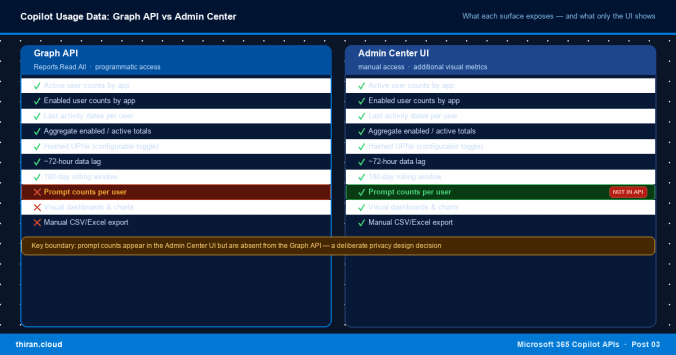
Per-user prompt counts are blocked by design. This is the single most important boundary to internalize. The documentation states it directly: tracking per-user Copilot prompt counts across tenants is not supported due to privacy and security constraints. This is a deliberate privacy decision, not a missing feature awaiting a future release. An admin who builds a pipeline expecting per-user prompt volume will not find it, and no permission level unlocks it.
The admin center shows more than the API. This is the discrepancy that catches teams off guard. The admin center UI displays prompt-count metrics — prompts submitted across apps, and prompt counts for Copilot Chat — directly in its table. Those same prompt-count metrics are absent from the Graph API response schema. If your reporting goal is per-user prompt volume, the admin center export is the source, not this API. Build your pipeline knowing the API and the UI are not field-for-field identical: the API returns last-activity dates and aggregate enabled/active counts; the UI adds prompt counts on top.
Conversation content is out of scope. Prompt text and Copilot responses never appear in this API. For content-level visibility — what was asked, what was returned, and whether sensitive information was involved — the surface is Microsoft Purview, not the usage reports API. Microsoft explicitly advises against using audit logs as the basis for usage reporting and against expecting usage reporting to provide content.
Unlicensed Copilot Chat usage is not captured. The API returns data only for users who hold a Microsoft 365 Copilot license. Usage from unlicensed Copilot Chat does not appear in any of the three endpoints.
| Data need | Right surface |
|---|---|
| Per-user prompt counts | M365 admin center UI / export |
| Prompt and response content | Microsoft Purview |
| Richer adoption analytics | Viva Insights Copilot Dashboard (separate subscription) |
| Unlicensed Copilot Chat usage | Admin center, Purview Audit Log, or Office 365 Management Activity API |
Note: Unlicensed Copilot Chat usage is excluded from this API entirely. If free-tier Copilot Chat is part of your governance scope, plan to source that data from the admin center or the Purview Audit Log — it will never appear in the Graph usage reports endpoints.
Privacy, Identity Obfuscation, and the Tenant Toggle
Admins calling the per-user endpoint for the first time are often surprised to see userPrincipalName and displayName come back as hashed values instead of real identities. This is the default, and it is deliberate.
By default, user identity is obfuscated across Microsoft 365 usage reports, Copilot included. To return real UPNs and display names, an admin must turn off identity obfuscation through the “Show user details in usage reports” setting in the Microsoft 365 admin center. That toggle is tenant-wide and governs the usage reports surface as a whole, not Copilot alone.
There is a second boundary that the toggle does not override. Even with obfuscation disabled, the Global Reader and Usage Summary Reports Reader roles still cannot see per-user detail rows. They are limited to tenant-level aggregates regardless of the identity setting. Identity visibility and row-level access are two separate controls.
Note: Enabling real user identities in usage reports is a governance decision each tenant makes deliberately. It exposes named individual activity to anyone holding a per-user-capable reporting role. Decide who should be able to attribute Copilot activity to named users — and document that decision — before turning obfuscation off.
Data Freshness, Windows, and Known Gaps
Anyone building a scheduled pipeline against this API needs to design around its timing and coverage characteristics.
The data is not real time. For Copilot activity on a given day, the report typically becomes available within roughly 72 hours of the end of that day in UTC. A nightly pull that expects to see yesterday’s activity will find it incomplete; account for that lag in how you schedule and how you report freshness to stakeholders. The system also runs daily data-validation checks across the past three days and backfills detected gaps, so recently reported figures can shift slightly as that validation completes.
The maximum query window is 180 days. There is no longer window available through the API, and you should not assume data is retained or retrievable beyond what the D180 and ALL periods expose.
Two coverage gaps are worth flagging. Active-usage data for Word, Excel, and PowerPoint is incomplete before January 25, 2024 — any “before and after” comparison that reaches earlier than that date for those three apps will be misleading. And the API is available in the worldwide (Global) cloud only.
Note: The Copilot Usage Reports API is not available in US Government Community Cloud (GCC), GCC High (US Gov L4), DoD (US Gov L5), or China (operated by 21Vianet). Admins in those environments cannot pull this data through Graph and should plan their adoption reporting around the admin center instead.
Connecting the API to Your Reporting Pipeline
With the endpoints, permissions, and boundaries understood, the integration pattern follows directly — and it is important to be honest about what Microsoft provides and what you build.
There is no dedicated Microsoft Power BI connector or Microsoft Fabric dataset for Copilot usage reports data. No official Learn documentation describes a packaged connector or template for this API. The realistic pattern is the general one for any Graph reporting endpoint: pull the JSON from the API, then ingest it into your pipeline using a generic JSON connector or dataflow. Power BI, Fabric, or any data platform can consume the response — but the connection is one you assemble, not one Microsoft ships pre-built for this data.
For scheduled, unattended pulls, use application permission (Reports.Read.All) with the client-credentials flow described in Post 02. An app-only call needs no signed-in user, which makes it the correct foundation for a nightly or weekly job that writes into a warehouse or BI model. Pull getMicrosoft365CopilotUserCountTrend for the time series that drives adoption charts, and getMicrosoft365CopilotUsageUserDetail when you need user-level last-activity rows — remembering to follow @odata.nextLink for large tenants.
The Viva Insights Copilot Dashboard is a separate, richer adoption surface. It uses the same underlying active-usage definitions but is a Power BI-backed product requiring a Viva Insights subscription, and it may differ from the API in population scope and timeframe. It is an alternative to building your own dashboard, not a connector for this API. If your organization already has the subscription, evaluate it before investing in a custom build; if it does not, the JSON-to-pipeline pattern above is the path.
Pre-Flight Checklist
Work through these before standing up a Copilot usage reporting pipeline.
Licensing
- Confirm the tenant has Microsoft 365 Copilot licenses assigned — only licensed users appear in the data
App registration
- Register an app in Microsoft Entra ID (see Post 02) for unattended pulls, or plan delegated access for interactive use
Permissions
- Grant
Reports.Read.All(application for scheduled jobs, delegated plus an admin role for interactive) - For delegated access, confirm the signed-in user holds Reports Reader or another per-user-capable role
Privacy governance
- Decide whether to leave user identities hashed or enable the “Show user details in usage reports” toggle — and document who can then see named activity
National cloud check
- Confirm the tenant is in the worldwide cloud — GCC, GCC High, DoD, and 21Vianet are not supported
Pipeline handling
- Build in the ~72-hour data lag, follow
@odata.nextLinkpagination, and do not expect per-user prompt counts from the API
How to Navigate This Series
This series runs 13 posts across three phases:
- Phase 1 — Foundations and Governance (Posts 1–4): API foundation, auth and permissions, rate limits and reliability, and usage reporting
- Phase 2 — Building with Core APIs (Posts 5–9): Package management, then one post per API surface — Retrieval, Chat, Meeting Insights, and AI Interactions Change Notifications
- Phase 3 — Agents and Extensibility (Posts 10–13): Connectors, declarative versus custom engine agents, Copilot Studio, and SPFx and enterprise integrations
By role:
- IT admins and Copilot deployment leads: Post 01 (landscape) → Post 02 (auth and permissions) → Post 04 (this post) → Post 05 (Package Management API)
- Adoption program managers: Post 04 → Post 05, then Post 09 (AI Interactions Change Notifications) if you want event-driven activity tracking instead of polling
- BI and reporting teams: Post 04 → the integration section above, then Post 02 for the app-only auth foundation
This post built on Post 01 — The Microsoft 365 Copilot API Foundation (the /v1.0/copilot/ namespace) and Post 02 — Auth, Permissions, SDK Patterns, and Production Readiness (Reports.Read.All and delegated versus application access).
The immediate next post is Post 05 — Managing Copilot Apps and Agents as an Admin: The Package Management API (Preview), which continues the admin governance arc into app and agent lifecycle management.
References
All claims in this post trace to the following official Microsoft documentation:
- copilotReportRoot resource type (lists all three v1.0 methods) — https://learn.microsoft.com/en-us/microsoft-365-copilot/extensibility/api/admin-settings/reports/resources/copilotreportroot
- getMicrosoft365CopilotUsageUserDetail (canonical v1.0 — permissions, schema, examples) — https://learn.microsoft.com/en-us/microsoft-365-copilot/extensibility/api/admin-settings/reports/copilotreportroot-getmicrosoft365copilotusageuserdetail
- getMicrosoft365CopilotUserCountSummary (canonical v1.0 — aggregate counts) — https://learn.microsoft.com/en-us/microsoft-365-copilot/extensibility/api/admin-settings/reports/copilotreportroot-getmicrosoft365copilotusercountsummary
- getMicrosoft365CopilotUserCountTrend (canonical v1.0 — daily trend) — https://learn.microsoft.com/en-us/microsoft-365-copilot/extensibility/api/admin-settings/reports/copilotreportroot-getmicrosoft365copilotusercounttrend
- getMicrosoft365CopilotUsageUserDetail (old beta — deprecation notice and field reference) — https://learn.microsoft.com/en-us/graph/api/reportroot-getmicrosoft365copilotusageuserdetail
- getMicrosoft365CopilotUserCountSummary (old beta — deprecation notice) — https://learn.microsoft.com/en-us/graph/api/reportroot-getmicrosoft365copilotusercountsummary
- Authorization for usage reports APIs (role requirements, app vs delegated) — https://learn.microsoft.com/en-us/graph/reportroot-authorization
- Microsoft 365 Copilot usage report (admin center — metric definitions, freshness, FAQ) — https://learn.microsoft.com/en-us/microsoft-365/admin/activity-reports/microsoft-365-copilot-usage
- Microsoft 365 Copilot APIs overview (namespace, licensing) — https://learn.microsoft.com/en-us/microsoft-365-copilot/extensibility/copilot-apis-overview
- Copilot Dashboard in Viva Insights (adjacent surface, not a Graph API) — https://learn.microsoft.com/en-us/viva/insights/org-team-insights/copilot-dashboard
- Microsoft Graph what’s new (no Copilot usage report changes as of June 2026) — https://learn.microsoft.com/en-us/graph/whats-new-overview