This component is developed as a SharePoint Framework Web-part to capture and store the comments. The web part can be used as replacement for the out-of-box comments box that is available in SharePoint Online. You can disable the out-of-box comments and this web-part to a page, save it as a template and you can start creating the pages based on the template.
Features
- Comments classification by Popular, Newest, Oldest and Attachments
- Support for sharing images, document, videos.
- Options like Edit, Reply (nested comments) & Delete are available.
- You can like the comments shared.
- You can make use of Hashtag & Ping Users.
- You can make use of Document Preview feature to view the files and videos shared in the comments.
- New icon will be displayed based on the current day’s comments
Properties
There are few properties associated with this web-part which gives you full control on the features, you shall be able to enable or disable features based on the configuration. Below are the properties that are configurable
- Date Time format on when the comments were added or modified
- Profile Picture style, whether it has to be rounded or square
- Enable or Disable Navigation whether to display the comments classification
- Enable or disable Attachments. Following properties are required when attachments are enabled
- Library to store the files uploaded.
- Allowed File Formats in the comments box.
- Maximum File Size allowed.
- Ping Users will allow to mention the users. The users are pulled from the Site Users.
- Edit comments can be enabled or disabled to allow the users to edit the comments. Files added can be deleted not edited.
- Delete option can be enabled or disabled to allow the users to delete the comments. Comments with no-replies are allowed to delete. Delete is allowed only if Edit is allowed.
- Up voting of comments to like or dislike the comments.
- Hashtags
- Document Preview can be enabled or disabled for the office files and videos.
Preview
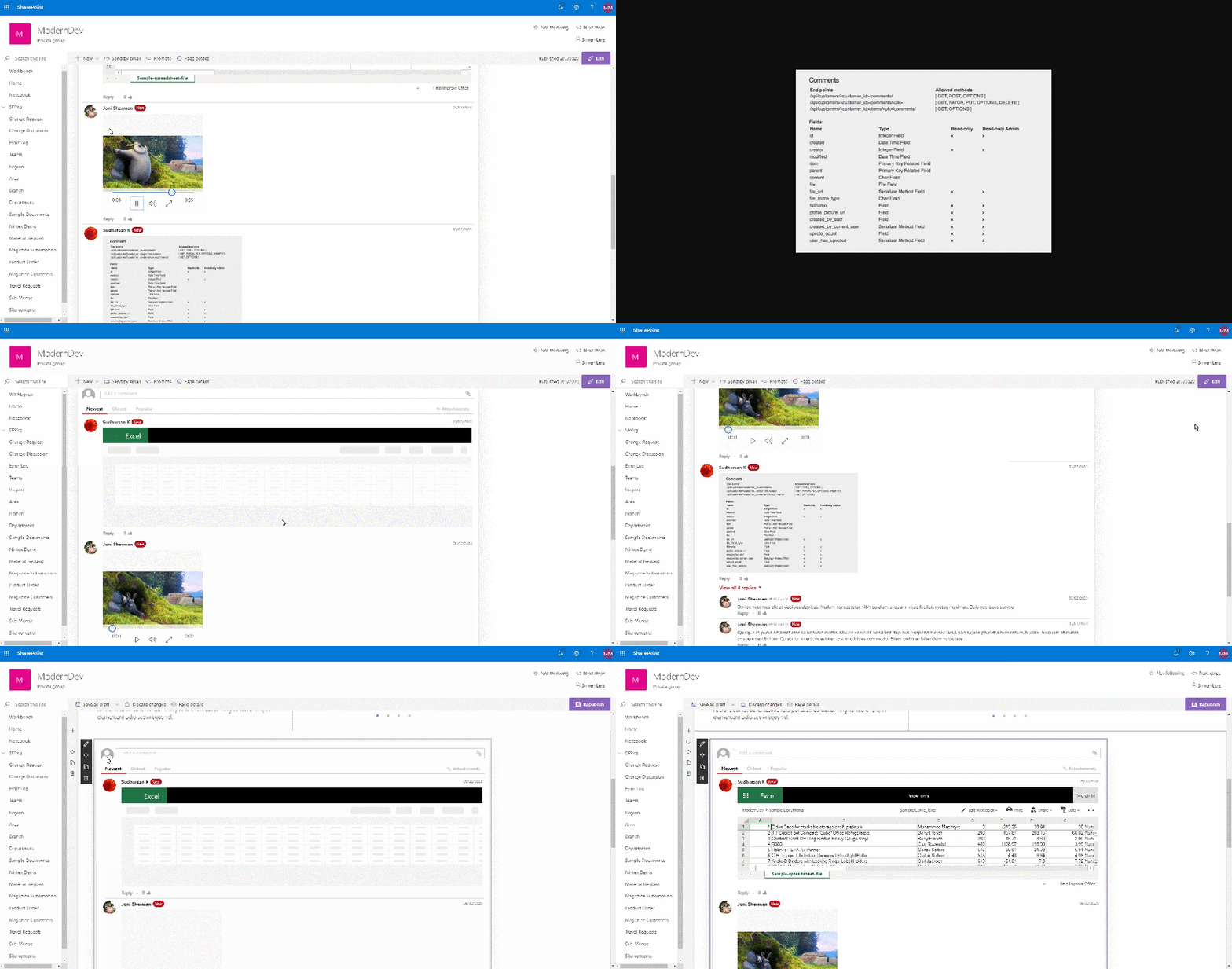
Below is a short video presented in the SharePoint Framework community call.
Source Code
The above web-part is shared with the community and is of free to use. Please click the below link to download the code and have fun.
https://github.com/pnp/sp-dev-fx-webparts/tree/master/samples/js-advanced-commenting
Happy Coding…
 Knowledge Share
Do the comments autorefresh without a page refresh?
LikeLike
Hi Shawn, the comments are not auto refreshed. I am planning to implement the auto update. Thanks for trying out the component, let me know if have any feedbacks.
LikeLike
Hi Sudarshan, Can this be used for classic pages?
LikeLike
I havent tried. Let me know if you have any issues. It should work.
LikeLike
Thanks – I took the source code, and updated to allow for “multiple” webparts on a page. We now have a 9 webpart page – with a photo and then comments/likes for each. It’s a gallery of images, with a separate LIKE/COMMENT for each.
I’ve made a set of changes – and can add them back to the repo – or include a screenshot/video – but I couldn’t find your email address.
LikeLike
You can use the contact page and send me your queries.
LikeLike
How to delete comments automatically from the root page comments list after someone deleted his/her comment on the web part located on news page?
LikeLike
Hi, when there is delete option enabled, the comments are deleted automatically from the list when the user deletes a comment. I am not sure what do u mean by root page comments and news page. Can you please explain in detail?
LikeLike
Advanced comment webpart solution stopped working after reaching 5k items. It is loads only but if I remove few comments from the list, it starts working again as long as 5k items will be not reached. Please provide a solution ASAP.
LikeLike
I use it successfully for years but now ir stopped working after reaching of 5k items on the list. It is loads only and if I remove few comments from the list, it starts working again, as long as 5k items will be not reached.
Do you maybe have any suggestion of idea please?
LikeLike
It worked for me successfully for years, but now it suddenly stopped working after reaching 5k items. It is loads only but if I remove few comments from the list, it starts working again as long as 5k items will be not reached. Do you have any idea?
LikeLike
It worked for me successfully for years, but now it suddenly stopped working after reaching 5k items. It is loads only but if I remove few comments from the list, it starts working again as long as 5k items will be not reached. Do you have any idea?
LikeLike
Hi let me chk and update u asap.
LikeLike
could you already check 🙂 ? thanks
LikeLike
Hello Sudharsan, it is very urgent as this competelly stopped working after reaching 5k of comments. Can you provide an update ASAP please?
LikeLike
Still waiting for you update. Please don’t ignore my request, thank you
LikeLike
Hi, I had sent you couple of emails, can you please check and revert me asap?
LikeLike
Hello Sudharsan, unfortunately I didn’t receive any email from you, I also checked the whole junk folder. I also send you an email and texted you on Teams, you can directly reply to avoid any typo. I would be very thankful, if you can contact me or just provide an update here for everyone.
LikeLike
Hi, I am trying to send msg in teams but its not delivering. You are saying that you are able to receive. Send me ur email address, let me send u the updated package. My email address is sudharsan_1985@live.in.
LikeLike
Please kindly try to mail me to 3980867435@proton.me
LikeLike
Hello Sudharsan,
last week I sent you the dev tool network logfile and screenrecording. Could you already check it? Any update on that bug?
Please kindly let me know,
Best regards and thanks in advance
Damian
LikeLike
Bro I sent an email with the latest package a week ago. I think there is some problem with ur email. I replied to ur email.
LikeLike
Unfortunarely, the same behaviour after updating to the lastest package.
LikeLike
Hi, have you updated the app to the latest version? I would like to have a screensharing session to check few things. Let me know your available time.
LikeLike
Hi, yes I did. I sent you an email, where you can book a matching appointment with me.
LikeLike
Hi, I am trying to send the latest package to ur email but its not delivering. Can you please send an email so that i can reply to ur email. Thanks
LikeLike
Hello Sudharsan, could you already update the github version package?
LikeLike
Very unprofessional und dissapointing that you don’t care about it and don’t react on my messages anymore
LikeLike
Hi, I think you misunderstood. I am sick for few days and I was not able to work or reply to your message. I had already sent the correct package couple of times to your email. Sometimes its delivering sometimes not. I am trying my maximum to support you and I hope you understand.
LikeLiked by 1 person
How to send notification to the mentioned users? I am able to mention any user in the comments but no notification is being sent. In short I want to know how mentioned users will be notified when they are tagged in the comment.
LikeLike