The Memory Problem
Imagine calling customer service and having this conversation:
You: “Hi, my name is Sarah, and I need help with my order.”
Agent: “I’d be happy to help! What’s your name?”
You: “Uh… Sarah. I just told you that.”
Agent: “Great! How can I help you today?”
You: “My order is delayed. Order #12345.”
Agent: “I can help with that! What’s your order number?”
You: 😤 *hangs up*
Frustrating, right? That’s what your AI agent is like WITHOUT state management.
In Part 2 – Understanding Activities, Turns & The Magic Behind M365 Agents, we learned that every turn is independent—your agent has amnesia between messages. It can handle one message beautifully, but it forgets everything immediately after.
Today, we’re fixing that.
By the end of this post, you’ll understand:
- 🏗️ The Agent Container – The architecture that makes state work
- 🧠 Three Types of State – Turn, Conversation, and User State
- 💾 Storage Options – Memory, Blob, Cosmos DB (when to use each)
- 🛒 Hands-on Project – Build a stateful shopping cart agent
- 🔧 Best Practices – State design patterns you’ll use every day
Ready to give your agent a memory? Let’s dive in! 🚀
What is State Management?
In simple terms: State management is how your agent stores and retrieves information across multiple turns.
It’s what lets your agent:
- Remember the user’s name throughout the conversation
- Track items in a shopping cart
- Follow multi-step workflows (fill out a form step-by-step)
- Personalize responses based on past interactions
- Resume conversations after hours or days
Real-World Example: Without vs With State
WITHOUT State Management:
User: Add pizza to my cartAgent: Added pizza! Total: 1 itemUser: Add sodaAgent: Added soda! Total: 1 item ← WRONG! Should be 2User: What's in my cart?Agent: I don't know what's in your cart ← AMNESIA!WITH State Management:
User: Add pizza to my cartAgent: Added pizza! Cart: 1 item (Pizza), Total: $12.99User: Add sodaAgent: Added soda! Cart: 2 items (Pizza, Soda), Total: $15.98 ← CORRECT!User: What's in my cart?Agent: Your cart: Pizza ($12.99), Soda ($2.99). Total: $15.98 ← REMEMBERS!State management is the difference between a frustrating experience and a delightful one.
The Agent Container: Your State Management Architecture
The Agent Container is the core architecture pattern in M365 Agents SDK. Think of it as a smart wrapper around your agent that handles state automatically.
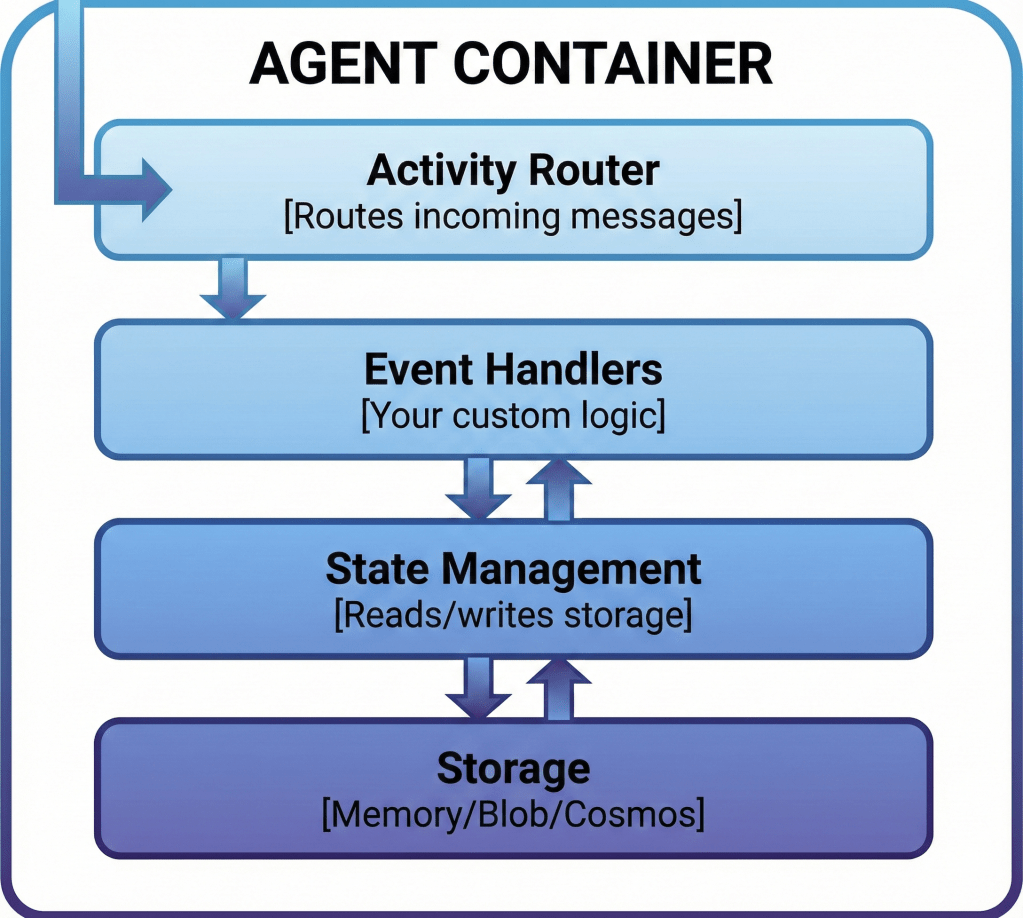
How It Works: The Complete Flow
Here’s what happens when a message arrives with the Agent Container pattern:
Step 1: Message Arrives
User sends “Add pizza to my cart”
Step 2: Load State
BEFORE your code runs, the container automatically loads state from storage:
// Container does this for you:const state = { conversation: { cart: ['Soda'], // Loaded from last conversation total: 2.99 }, user: { name: 'Sarah', // Loaded from user profile preferredCurrency: 'USD' }};Step 3: Your Code Runs
Your handler gets the state object automatically:
agent.onMessage('/add', async (context, state) => { // state is already loaded! state.conversation.cart.push('Pizza'); state.conversation.total += 12.99; await context.sendActivity(`Added pizza! Total: $${state.conversation.total}`);});Step 4: Save State
AFTER your code finishes, the container automatically saves state back to storage. You don’t call save()—it happens automatically!
Step 5: Response Sent
User sees “Added pizza! Total: $15.98”
✨ The Magic: You never manually call state.load() or state.save(). The Agent Container does it automatically at the start and end of every turn. This is HUGE—it eliminates an entire category of bugs!
The Three Types of State
M365 Agents SDK gives you three state scopes, each with different lifetimes and use cases:
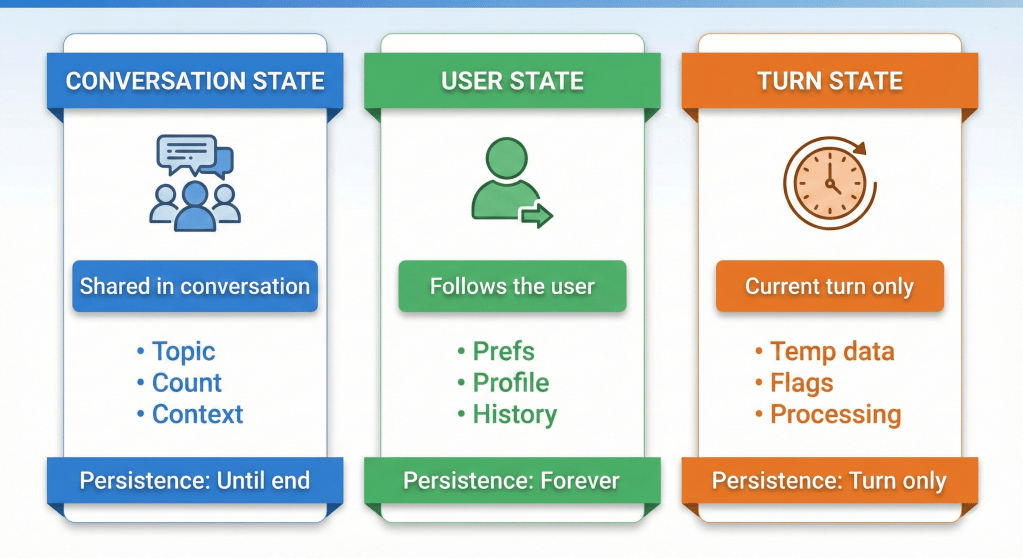
1. Turn State (Temporary – One Turn Only)
Lifetime: Exists only for the current turn. Destroyed when turn completes.
Scope: This specific request-response cycle
Not saved to storage
Perfect for:
- Temporary calculations
- Passing data between middleware layers
- Caching API responses for the current turn
- Flags that only matter during processing
Example:
agent.onMessage('/weather', async (context, state) => { // Turn state: temporary, won't be saved state.temp.isProcessing = true; state.temp.apiCallCount = 0; const weather = await fetchWeather(context, state.temp); await context.sendActivity(weather); // state.temp is destroyed after this turn completes});2. Conversation State (Conversation Lifetime)
Lifetime: Persists for the entire conversation (until explicitly deleted)
Scope: This specific conversation/channel
Storage Key: Conversation ID
Perfect for:
- Shopping carts
- Multi-step forms (wizard flows)
- Conversation context (“What are we talking about?”)
- Recent history within this conversation
- Temporary session data
Example:
agent.onMessage('/add', async (context, state) => { // Conversation state: persists across turns in THIS conversation state.conversation.cart = state.conversation.cart || []; state.conversation.cart.push({ item: 'Pizza', price: 12.99 }); await context.sendActivity(`Cart: ${state.conversation.cart.length} items`); // Next message in THIS conversation will still have the cart});Important: Conversation state is isolated per conversation. If the user messages your agent in Teams AND on your website, those are TWO different conversations with separate state.
3. User State (Forever – Until Deleted)
Lifetime: Persists forever (across all conversations)
Scope: This specific user (across all conversations/channels)
Storage Key: User ID
Perfect for:
- User preferences (language, timezone, theme)
- Profile information (name, email, role)
- Long-term history (total purchases, favorite items)
- Settings and configurations
- Personalization data
Example:
agent.onMessage('/setname', async (context, state) => { // User state: persists FOREVER across ALL conversations const name = context.activity.text.replace('/setname ', ''); state.user.profile = state.user.profile || {}; state.user.profile.name = name; await context.sendActivity(`Got it! I'll remember your name is ${name}.`); // Next week, in a different conversation, state.user.profile.name is STILL "Sarah"});agent.onMessage('/hello', async (context, state) => { const name = state.user.profile?.name || 'there'; await context.sendActivity(`Hello ${name}!`); // Works even if this is a brand new conversation!});Quick Reference Table
| State Type | Lifetime | Storage Key | Use Cases |
|---|---|---|---|
| Turn State | 1 turn only | Not saved | Temporary calculations, flags, caching |
| Conversation State | Until conversation ends | Conversation ID | Shopping cart, forms, session data |
| User State | Forever | User ID | Preferences, profile, personalization |
Storage Options: Where Does State Live?
You’ve chosen which state scope to use. Now you need to decide WHERE to store it. M365 Agents SDK supports three storage backends:
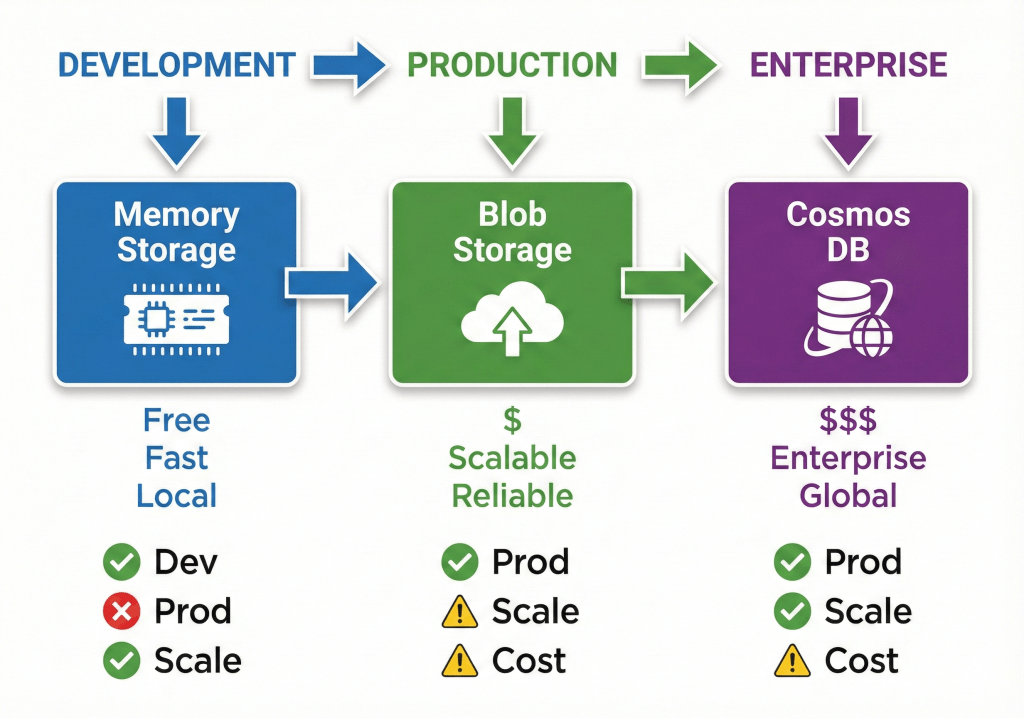
1. Memory Storage (In-RAM)
What it is: State stored in server RAM (not persistent)
Speed: ⚡ Extremely fast
Persistence: ❌ Lost on restart
Use for:
- Local development and testing
- Prototypes and demos
- When you explicitly want ephemeral state
Don’t use for:
- Production environments
- Anything you need to keep after server restart
Setup:
import { MemoryStorage } from '@microsoft/agents-hosting';const agent = new AgentApplication({ storage: new MemoryStorage() // That's it!});Pros: Zero configuration, blazing fast, perfect for dev
Cons: Data lost on restart, doesn’t scale across multiple servers
2. Azure Blob Storage (Persistent Files)
What it is: State stored as JSON files in Azure Blob Storage
Speed: 🚀 Fast (network latency)
Persistence: ✅ Fully persistent
Use for:
- Production agents with moderate scale
- When you need persistent state without DB complexity
- Cost-effective scaling
Don’t use for:
- High-frequency writes (Blob has rate limits)
- When you need to query across users (Blob is key-value only)
Setup:
import { BlobsStorage } from '@microsoft/agents-hosting-azure';const storage = new BlobsStorage( 'DefaultEndpointsProtocol=https;AccountName=mystorageaccount;...', // Connection string 'agent-state' // Container name);const agent = new AgentApplication({ storage });Pros: Persistent, scalable, cheap ($0.02/GB/month)
Cons: Requires Azure account, can’t query across state
3. Azure Cosmos DB (Global Database)
What it is: State stored in Azure Cosmos DB (NoSQL database)
Speed: 🚀 Fast (single-digit ms latency)
Persistence: ✅ Fully persistent + queryable
Use for:
- Production at scale (millions of users)
- When you need to query across users (analytics, leaderboards)
- Global distribution requirements
- Complex state scenarios
Don’t use for:
- Small projects (overkill + more expensive)
- When simple key-value storage is enough
Setup:
import { CosmosDbPartitionedStorage } from '@microsoft/agents-hosting-azure';const storage = new CosmosDbPartitionedStorage({ cosmosDbEndpoint: 'https://mycosmosdb.documents.azure.com:443/', authKey: 'your-cosmos-db-key', databaseId: 'agent-database', containerId: 'agent-state'});const agent = new AgentApplication({ storage });Pros: Globally distributed, queryable, massive scale, SLA guarantees
Cons: Most expensive option, requires Azure setup
Which Storage Should You Choose?
Decision Framework:
Use Memory Storage if: You’re developing locally or building a prototype
Use Blob Storage if: You need persistence, moderate scale (< 100k users), and simple key-value access
Use Cosmos DB if: You need global scale, querying across users, or sub-10ms latency worldwide
Hands-On: Build a Stateful Shopping Cart Agent
Let’s put everything together and build a real shopping cart agent that demonstrates all three state scopes.
The Complete Shopping Cart Agent
import { AgentApplication, MemoryStorage } from '@microsoft/agents-hosting';import { ActivityTypes } from '@microsoft/agents-activity';// Create agent with memory storage (use Blob or Cosmos in production!)const agent = new AgentApplication({ storage: new MemoryStorage()});// Welcome new usersagent.onActivity(ActivityTypes.ConversationUpdate, async (context, state) => { const membersAdded = context.activity.membersAdded || []; for (const member of membersAdded) { if (member.id !== context.activity.recipient.id) { // Initialize conversation state state.conversation.cart = []; state.conversation.total = 0; // Check if returning user const userName = state.user.profile?.name || member.name; const returningUser = !!state.user.profile?.name; let greeting = `Welcome ${returningUser ? 'back' : ''} ${userName}! 🛒`; if (returningUser) { greeting += `\n\nGreat to see you again! You've made ${state.user.stats?.totalOrders || 0} orders with us.`; } greeting += `\n\n**Commands:**\n` + `• /menu - View available items\n` + `• /add [item] - Add to cart\n` + `• /cart - View your cart\n` + `• /checkout - Complete order\n` + `• /clear - Clear cart\n` + `• /setname [name] - Set your name`; await context.sendActivity(greeting); } }});// Product catalog (in real app, this would be from a database)const MENU = { pizza: { name: 'Pizza', price: 12.99, emoji: '🍕' }, burger: { name: 'Burger', price: 9.99, emoji: '🍔' }, soda: { name: 'Soda', price: 2.99, emoji: '🥤' }, fries: { name: 'Fries', price: 4.99, emoji: '🍟' }, salad: { name: 'Salad', price: 7.99, emoji: '🥗' }};// Show menuagent.onMessage('/menu', async (context, state) => { let menuText = '🍽️ **Menu:**\n\n'; for (const [key, item] of Object.entries(MENU)) { menuText += `• ${item.emoji} **${item.name}** - $${item.price.toFixed(2)}\n`; } menuText += `\nType \`/add [item]\` to add to your cart!`; await context.sendActivity(menuText);});// Add item to cartagent.onMessage(/^\/add\s+(\w+)/i, async (context, state) => { const match = context.activity.text.match(/^\/add\s+(\w+)/i); const itemKey = match[1].toLowerCase(); // Turn state: temporary flag for this turn only state.temp.operationStartTime = Date.now(); const item = MENU[itemKey]; if (!item) { await context.sendActivity( `❌ Sorry, "${itemKey}" is not on the menu. Type \`/menu\` to see available items.` ); return; } // Conversation state: cart persists for this conversation state.conversation.cart = state.conversation.cart || []; state.conversation.cart.push(item); state.conversation.total = (state.conversation.total || 0) + item.price; // User state: track lifetime stats state.user.stats = state.user.stats || { totalItemsAdded: 0 }; state.user.stats.totalItemsAdded += 1; const operationTime = Date.now() - state.temp.operationStartTime; await context.sendActivity( `✅ Added ${item.emoji} **${item.name}** to your cart!\n\n` + `**Cart:** ${state.conversation.cart.length} items\n` + `**Total:** $${state.conversation.total.toFixed(2)}\n\n` + `Type \`/cart\` to view your cart or \`/checkout\` to complete your order.\n` + `_Processed in ${operationTime}ms_` );});// View cartagent.onMessage('/cart', async (context, state) => { const cart = state.conversation.cart || []; if (cart.length === 0) { await context.sendActivity( `🛒 Your cart is empty.\n\nType \`/menu\` to see available items!` ); return; } let cartText = '🛒 **Your Cart:**\n\n'; // Group items by name and count quantities const itemCounts = {}; cart.forEach(item => { itemCounts[item.name] = itemCounts[item.name] || { count: 0, price: item.price, emoji: item.emoji }; itemCounts[item.name].count += 1; }); for (const [name, data] of Object.entries(itemCounts)) { const itemTotal = data.count * data.price; cartText += `• ${data.emoji} ${name} x${data.count} - $${itemTotal.toFixed(2)}\n`; } cartText += `\n**Total: $${state.conversation.total.toFixed(2)}**\n\n`; cartText += `Type \`/checkout\` to complete your order or \`/clear\` to start over.`; await context.sendActivity(cartText);});// Clear cartagent.onMessage('/clear', async (context, state) => { const itemCount = state.conversation.cart?.length || 0; state.conversation.cart = []; state.conversation.total = 0; await context.sendActivity( `🗑️ Cart cleared! Removed ${itemCount} items.\n\nType \`/menu\` to start over.` );});// Checkoutagent.onMessage('/checkout', async (context, state) => { const cart = state.conversation.cart || []; if (cart.length === 0) { await context.sendActivity(`❌ Your cart is empty! Add items with \`/add [item]\`.`); return; } const total = state.conversation.total; const userName = state.user.profile?.name || context.activity.from.name; // Update user lifetime stats state.user.stats = state.user.stats || { totalOrders: 0, totalSpent: 0 }; state.user.stats.totalOrders += 1; state.user.stats.totalSpent += total; await context.sendActivity( `✅ **Order Confirmed!**\n\n` + `Thank you ${userName}! Your order of ${cart.length} items totaling $${total.toFixed(2)} has been placed.\n\n` + `📊 **Your Stats:**\n` + `• Total orders: ${state.user.stats.totalOrders}\n` + `• Lifetime spent: $${state.user.stats.totalSpent.toFixed(2)}\n\n` + `Order #${Math.random().toString(36).substring(2, 10).toUpperCase()}\n` + `Estimated delivery: 30-45 minutes 🚗` ); // Clear conversation cart after checkout state.conversation.cart = []; state.conversation.total = 0;});// Set user nameagent.onMessage(/^\/setname\s+(.+)/i, async (context, state) => { const match = context.activity.text.match(/^\/setname\s+(.+)/i); const name = match[1]; state.user.profile = state.user.profile || {}; state.user.profile.name = name; await context.sendActivity( `✅ Got it! I'll remember your name is **${name}**.\n\n` + `This will persist across all conversations, even if you leave and come back later!` );});// Help commandagent.onMessage('/help', async (context, state) => { await context.sendActivity( `🛒 **Shopping Cart Agent - Help**\n\n` + `**Menu & Shopping:**\n` + `• \`/menu\` - View available items\n` + `• \`/add [item]\` - Add item to cart (e.g., /add pizza)\n` + `• \`/cart\` - View your current cart\n` + `• \`/checkout\` - Complete your order\n` + `• \`/clear\` - Empty your cart\n\n` + `**Profile:**\n` + `• \`/setname [name]\` - Set your name\n` + `• \`/stats\` - View your lifetime stats\n\n` + `**Other:**\n` + `• \`/help\` - Show this help message` );});// View lifetime statsagent.onMessage('/stats', async (context, state) => { const stats = state.user.stats || { totalOrders: 0, totalSpent: 0, totalItemsAdded: 0 }; const userName = state.user.profile?.name || context.activity.from.name; await context.sendActivity( `📊 **Your Lifetime Stats**\n\n` + `👤 Name: ${userName}\n` + `📦 Total orders: ${stats.totalOrders}\n` + `💰 Total spent: $${(stats.totalSpent || 0).toFixed(2)}\n` + `🛒 Items added to cart (all time): ${stats.totalItemsAdded}\n\n` + `_These stats persist forever across all conversations!_` );});// Catch-allagent.onActivity(ActivityTypes.Message, async (context) => { await context.sendActivity( `I didn't understand that command. Type \`/help\` to see available commands!` );});export default agent;What This Agent Demonstrates
This complete agent showcases everything you learned:
- ✅ Turn State –
state.temp.operationStartTimefor timing (not saved) - ✅ Conversation State –
state.conversation.cartpersists for this conversation only - ✅ User State –
state.user.profileandstate.user.statspersist forever - ✅ Automatic Load/Save – Agent Container handles it (no manual calls!)
- ✅ State initialization – Using
||operators for defaults - ✅ Complex state logic – Grouping items, calculating totals, tracking lifetime stats
Try It Yourself!
🎯 Challenge: Extend This Agent
Add these features to practice state management:
1. /remove [item] – Remove an item from the cart
2. /favorite [item] – Save favorite items in user state
3. /reorder – Reorder your last order (needs user state history)
4. /promo - Apply discount codes (track in conversation state)
All the patterns you need are in the code above!
State Design Best Practices
1. Always Initialize State with Defaults
❌ Bad:
agent.onMessage('/add', async (context, state) => { state.conversation.cart.push(item); // ERROR if cart doesn't exist!});✅ Good:
agent.onMessage('/add', async (context, state) => { state.conversation.cart = state.conversation.cart || []; state.conversation.cart.push(item);});2. Keep State Minimal
Only store what you NEED to persist. Don't store things you can calculate:
❌ Bad:
state.conversation.cart = [item1, item2, item3];state.conversation.itemCount = 3; // Redundant! Can calculate from cart.lengthstate.conversation.hasItems = true; // Redundant! Can check cart.length > 0✅ Good:
state.conversation.cart = [item1, item2, item3];// Calculate on demand:const itemCount = state.conversation.cart.length;const hasItems = itemCount > 0;3. Use Namespaces for Complex State
❌ Bad (flat structure):
state.user.firstName = 'John';state.user.lastName = 'Doe';state.user.email = 'john@example.com';state.user.totalOrders = 5;state.user.totalSpent = 150.00;state.user.favoriteItem = 'pizza';✅ Good (namespaced):
state.user.profile = { firstName: 'John', lastName: 'Doe', email: 'john@example.com'};state.user.stats = { totalOrders: 5, totalSpent: 150.00};state.user.preferences = { favoriteItem: 'pizza'};4. Clean Up Expired State
Consider adding timestamps and cleaning up old data:
agent.onMessage('/start', async (context, state) => { const cart = state.conversation.cart || []; const lastActivity = state.conversation.lastActivity; // Clear cart if older than 24 hours if (lastActivity && Date.now() - lastActivity > 24 * 60 * 60 * 1000) { state.conversation.cart = []; await context.sendActivity(`Your cart expired and has been cleared.`); } state.conversation.lastActivity = Date.now();});5. Handle State Migration
As your agent evolves, you might need to change state structure. Handle old formats gracefully:
agent.onMessage('/cart', async (context, state) => { // Old format: state.conversation.cart = ['pizza', 'soda'] // New format: state.conversation.cart = [{name: 'pizza', price: 12.99}, ...] if (Array.isArray(state.conversation.cart) && typeof state.conversation.cart[0] === 'string') { // Migrate old format to new format state.conversation.cart = state.conversation.cart.map(itemName => ({ name: itemName, price: MENU[itemName.toLowerCase()]?.price || 0 })); } // Now use new format safely});Debugging State Issues
1. Log State at Turn Boundaries
agent.onActivity(ActivityTypes.Message, async (context, state) => { console.log('=== Turn Started ==='); console.log('Conversation State:', JSON.stringify(state.conversation, null, 2)); console.log('User State:', JSON.stringify(state.user, null, 2)); // Your handler logic... console.log('=== Turn Ended ==='); console.log('Updated Conversation State:', JSON.stringify(state.conversation, null, 2)); console.log('Updated User State:', JSON.stringify(state.user, null, 2));});2. Add a /debug Command
agent.onMessage('/debug', async (context, state) => { await context.sendActivity( `**Debug Info:**\n\n` + `\`\`\`json\n` + `Conversation State:\n${JSON.stringify(state.conversation, null, 2)}\n\n` + `User State:\n${JSON.stringify(state.user, null, 2)}\n` + `\`\`\`` );});3. Monitor Storage Operations
If using Blob or Cosmos, monitor the actual storage to ensure saves are happening:
// Azure Portal → Storage Account → Containers → agent-state// You should see files like:// - conversations/19:meeting-id/state.json// - users/29:user-aad-id/state.jsonWhat's Next: Multi-Channel Deployment
You now understand how to make your agent remember things using state management. You've mastered conversation state, user state, and storage options.
But here's the next big question:
How do you deploy this agent so users can actually access it?
How do you make it available in Microsoft Teams? M365 Copilot? Your website? Email?
That's what we'll cover in Part 4!
🎓 Coming in Part 4: Multi-Channel Deployment & Adapters
You'll learn:
• How channel adapters work
• Deploying to Microsoft Teams
• Adding M365 Copilot integration
• Web chat, email, and SMS channels
• Write once, run everywhere strategy
• Building a production-ready agent
Key Takeaways
- 🏗️ Agent Container - Automatically loads and saves state at turn boundaries
- 🧠 Three State Scopes - Turn (temporary), Conversation (session), User (forever)
- 💾 Storage Options - Memory (dev), Blob (production), Cosmos DB (scale)
- ✅ No Manual Save - State saves automatically after each turn
- 🔧 Initialize with Defaults - Always use
|| []or|| {}patterns - 📦 Namespace Complex State - Use profile, stats, preferences objects
- 🧹 Clean Up Expired Data - Add timestamps and expiration logic
Practice Exercise
🎯 Build a Multi-Step Form Agent
Requirements:
1. Collect user info step-by-step (name, email, phone, reason)
2. Store progress in conversation state so users can pause and resume
3. Store completed forms in user state (history)
4. Add /status to show progress
5. Add /reset to start over
Use the shopping cart agent as a template. You've got this!
Join the Conversation
How did you do with the shopping cart agent? What features did you add?
- What's your biggest "aha!" moment about state management?
- Which storage option will you use in your project?
- Any questions about conversation vs user state?
Drop a comment below—I read and respond to every one! 💬
Happy Sharing...
 Knowledge Share