Introduction
Hi friends, in this post we will see how we can use PnP.Core SDK to delete bulk items in SharePoint Online. In my previous post How to use PnP.Core SDK to secure communication with SharePoint Online, I have shown you the step-by-step approach to the initial setup and configuration. From this post and for future posts, I will be using the same code repo and will add additional methods based on the post.
What is Batching?
Batching combines a set of requests and send them as one request that performs multiple operation in a single request. The main advantage of using Batching will optimizes communication between the client application and SharePoint by reducing the number of network calls.
Why Use Batching?
Performance Optimization:
- Each HTTP request has an overhead (e.g., connection setup, headers, and latency).
- By combining multiple operations into a single batch, you minimize the overhead, resulting in faster execution.
Reduced Network Traffic:
- Instead of sending multiple requests to SharePoint, batching consolidates them, lowering the number of requests over the network.
Atomicity:
- Batches allow executing multiple operations together. If one operation in a batch fails, the rest might still succeed (depending on configuration), allowing finer control over how errors are handled.
Cost-Efficiency:
- For environments with limited API call quotas, batching reduces the number of API calls, which can help avoid hitting limits.
Simplified Code:
- Instead of writing separate logic for each request, you can group them together, making the code cleaner and easier to manage.
Focus on the Code
Note: I will use the same repo from the previous article so the configuration and other settings we made on the Azure Portal remain the same.
In this sample we will see how we can use batching to delete bulk items from the list which has more than 5000 items and also without hitting the throttle limit.
async Task DeleteListItemsByBatch(PnPContext ctx, string strListname)
{
    try
    {
        var batch = ctx.NewBatch();
        Dictionary<Guid, int> deletedListItemIds = new();
        List<IListItem> targetItems = await GetListDataAsStreamWithPaging(ctx, strListname, Queries.qry_AllService, false);
        if (targetItems?.Count > 0)
        {
            IEnumerator<IListItem> itemsEnum = targetItems.GetEnumerator();
            while (itemsEnum.MoveNext())
            {
                await itemsEnum.Current.DeleteBatchAsync(batch);
                deletedListItemIds.Add(batch.Requests.Last().Value.Id, itemsEnum.Current.Id);
            }
            List<BatchResult> batchResponse = await ctx.ExecuteAsync(batch, false);
            foreach (var batchRes in batchResponse)
            {
                var failedListItemIdDelete = deletedListItemIds.FirstOrDefault(p => p.Key == batchRes.BatchRequestId);
            }
        }
        Console.WriteLine("Items deleted!");
    }
    catch (Exception ex)
    {
        Console.WriteLine(ex.ToString());
    }
}
The above method accepts the PnPContext and List title as an argument.
- Create a new batch
- Create a Key,Value pair collection to store the individual batch request id
- Using the CAML query to fetch the target items that has to be deleted
- Add each item to the Batch Request using DeleteBatchAsync and pass in the new batch variable
- Once added the request, add the batch request id to the key,value pair
- Once all the items are added to the batch request, execute the batch and capture the response
- We can verify the error by comparing the key,value pair with the batch response.
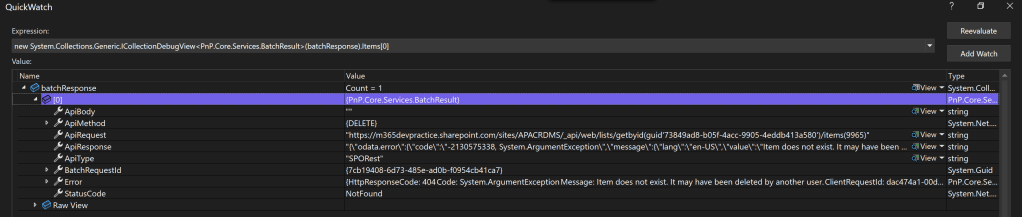
As I already mentioned, we are deleting the list with more than 5K items, but we didn’t code any logic to break the items in to chunks or any other business logic, we just called the Delete method.
This is one of the main advantage of using PnP.Core SDK. The SDK is designed to use batch internally for the execution. Even if we send 5K items in 1 request, the SDK will break the items in to multiple batches with the individual batch of 100 items and then execute the batch one by one which will not cause any limitation issues with SharePoint. 100 requests per batch is when the SDK use SharePoint REST API, 20 requests per batch is when the SDK tries to use Graph API.
Note: The limit of 100 or 20 cannot be modified
Conclussion
I hope you had learned something new on PnP.Core SDK. In my future blog post, I am planning to cover the methods related to user profile property update and how to use PnP.Core SDK in Azure Function.
I welcome your suggestions and feedback which will help me in contributing the information that help others to complete their tasks or achieve the business process.
https://github.com/sudharsank/PnPCoreDemo
Happy Coding…
 Knowledge Share