Hi Friends, in this post, we are gonna see about the SharePoint Brand Center. The SharePoint Brand Center is a centralized platform designed to manage and maintain your organization’s branding elements within the SharePoint environment. It streamlines the process of ensuring brand consistency across all SharePoint sites and provides tools for customization and integration with other applications.
What is SharePoint Brand Center?
The SharePoint Brand Center is a feature within SharePoint that allows organizations to manage their branding assets, such as logos, themes, and templates, from a single, centralized location. This ensures that all SharePoint sites adhere to the organization’s brand guidelines, providing a cohesive and professional look.
Advantages of using the Brand Center
- Consistency: Ensures brand consistency across all SharePoint sites.
- Efficiency: Streamlines the process of applying branding elements.
- Customization: Allows for easy customization to reflect your brand’s unique identity.
- Integration: Seamlessly integrates with other Microsoft 365 applications.
Pre-requisites for Configuring the Brand Center
- SharePoint Online: Ensure you have an active subscription.
- Permissions: Global Admin privileges are required.
- Brand Assets: Gather all necessary branding elements (logos, fonts, color codes).
Steps to Set Up
The setup process is done entirely through the UI. It requires global administrator privileges and the use of a public CDN. The configuration will vary depending on your current tenant setup and may fall into one of the following scenarios:
- No SharePoint Organization Assets configured
- Using SharePoint Organization Assets with a Private CDN
- Using SharePoint Organization Assets with a Public CDN
Let’s now go into detail on how to configure the SharePoint Brand Center.
Navigate to Org Settings from the M365 Admi Center
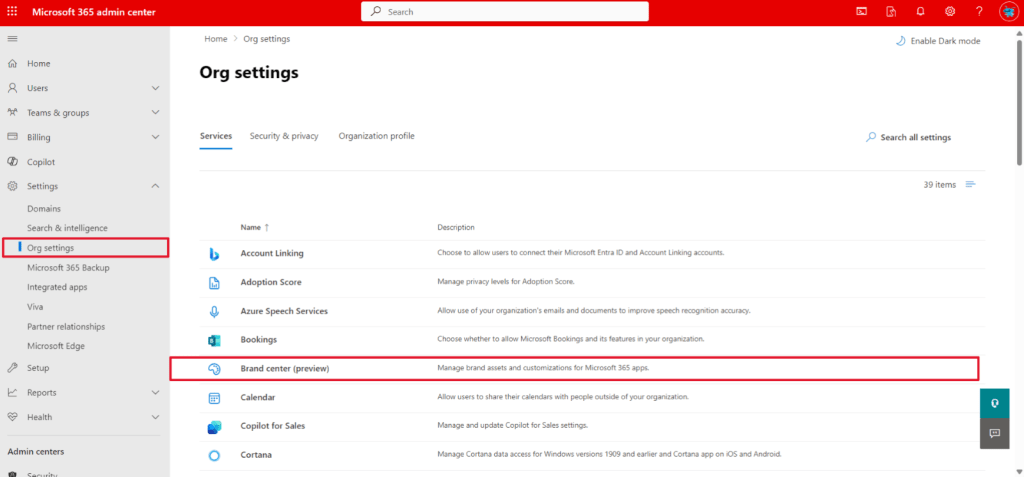
In the below tenant, I had already configured the SharePoint Organization Assets and the Public CDN. So, when I navigate to the Brand Center, it will recognize the site and just provide you with the links to the Brand Site and the Brand App.

In the below tenant, there are no SharePoint Organization Assets, no Private or Public CDN configured. So, you should be able to provide the Site Name, Site Url, and agreed to activate the Public CDN.

Once the Brand Center is created or activated, copy the link to the Brand Center App and you should be able to see the app like the screenshot below.
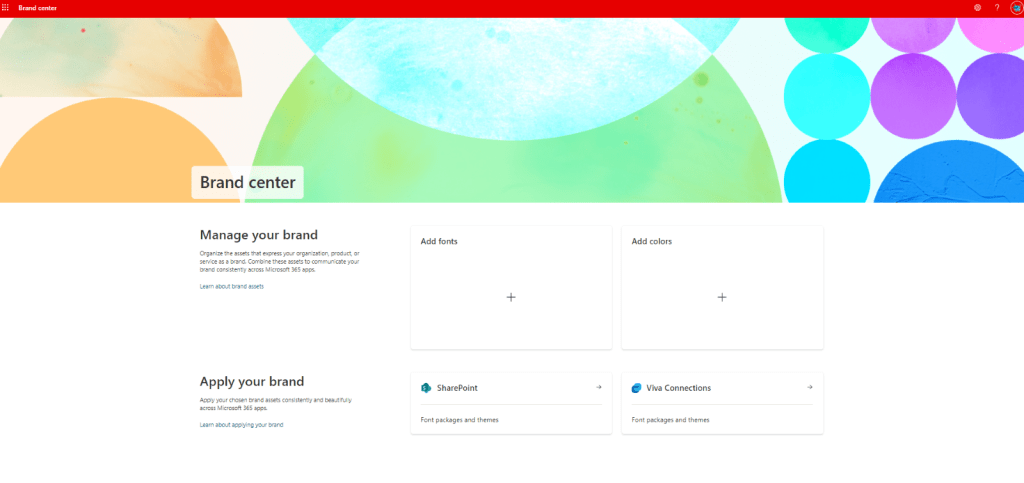
Note: The app link navigates to the layouts 15 folder and even if you try with the other site collection, the app does not work and it throws the access denied page.
Common Challenges and How to Overcome Them
- Challenge: Inconsistent branding across sites. Solution: Regularly review and update branding elements.
- Challenge: Limited customization options. Solution: Utilize third-party tools and extensions.
- Challenge: Lack of user training. Solution: Provide comprehensive training sessions for team members.
Best Practices for Maintaining the Brand Center
- Regularly review and update branding assets.
- Ensure all team members are trained on using the Brand Center.
- Monitor user feedback and make necessary adjustments.
Troubleshooting
Here are solutions to some of the most frequently asked questions:
- Issue: Branding elements not displaying correctly. Solution: Clear browser cache and refresh the page.
- Issue: Permissions issues. Solution: Verify administrative privileges and reassign if necessary.
Summary and Further Reading
- The SharePoint Brand Center centralizes and simplifies brand management.
- It offers numerous advantages, including consistency, efficiency, and customization.
- Preparation and proper setup are key to successful implementation.
- Overcoming common challenges involves regular updates and user training.
- Best practices ensure continuous improvement and effective brand management.
Conclusion
In conclusion, the SharePoint Brand Center is an invaluable tool for any organization looking to maintain brand consistency, improve efficiency, and ensure proper customization. By addressing common challenges through regular updates and comprehensive user training, you can maximize the benefits of this powerful platform. Adhering to best practices will further enhance your brand management efforts, ensuring continuous improvement and success.
Stay tuned for our next article, where we will delve into detailed instructions on how to effectively use the Brand Center. We will provide step-by-step guidance to help you navigate its features, maximize its capabilities, and leverage its full potential for your brand management needs.
Happy Sharing…
 Knowledge Share
Pingback: Brand Colors Using SharePoint Brand Center | Knowledge Share
Pingback: Brand Fonts Using SharePoint Brand Center | Knowledge Share
Pingback: How to use Brand Fonts in SPFx Web part | Knowledge Share